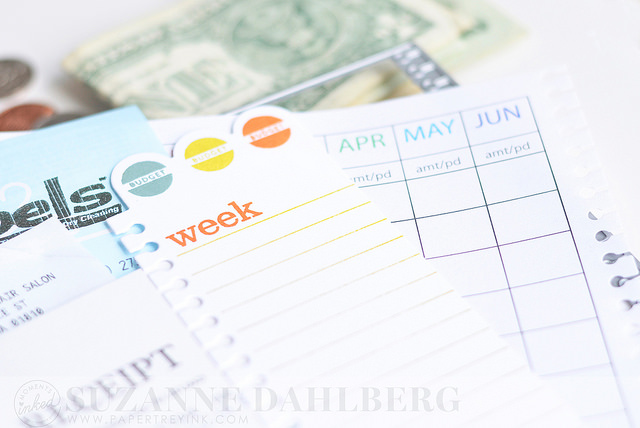
Happy Monday, everyone! This week I am sharing some tips and tricks for tracking bills and budgeting using the Moments Inked Planner system. Since I am paid monthly, it is really helpful for me to do this, but it’s also very important that it be simple. I’ve found that a 2-part system works best for me. Let’s get to Part 1 first: tracking bills.
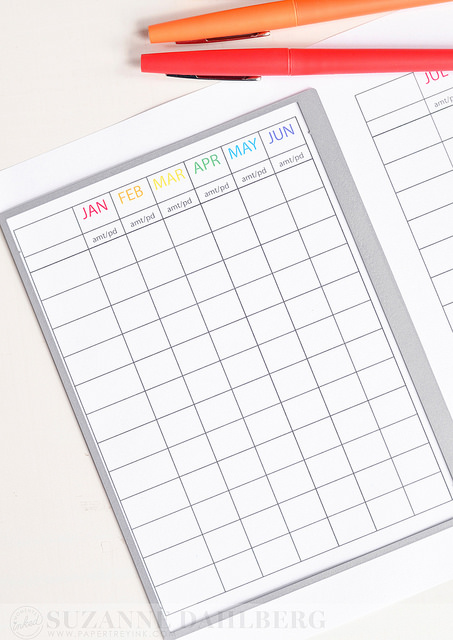
I designed a bill tracker to coordinate with the full page die from the MI Divided Die set - this file fits the months of the year across 2 pages on one 8.5″ x 11″ sheet of paper. I recommend die cutting the pages so that the binding cuts towards the center of the page because this will allow you to view the entire year spread across 2 pages, without having to turn the page.
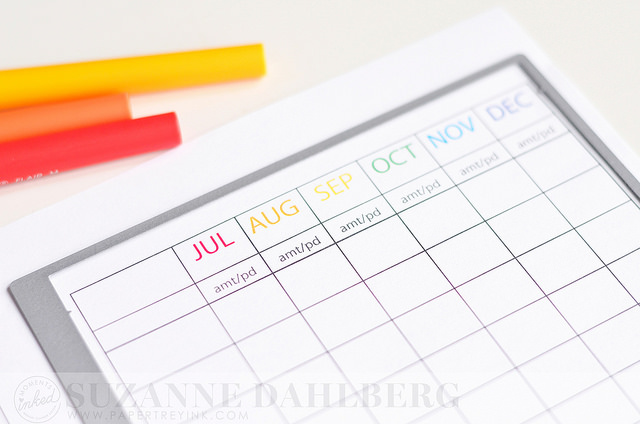
Above you can see that I am cutting the page with the second half of the year (July - December) so that the binding cuts to the left of the grid.
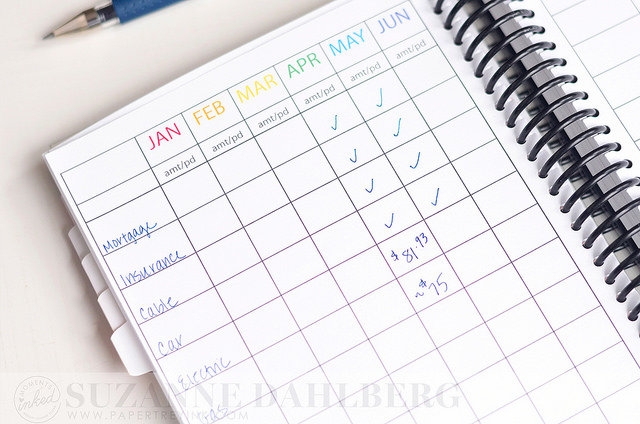
Next, I list all of my monthly bills in the far left column. I’ve sorted mine so that the bills with fixed costs are listed first, followed by the bills that vary from month to month (like electric, gas, etc.) I check off the fixed bills as they’ve been paid; I write in the amount paid for bills that vary - this is to help me get an idea for how much the variability impacts the rest of my budget. Alternatively, you could list bills in order of the date due or in alphabetical order - whatever works best for you will be easiest!
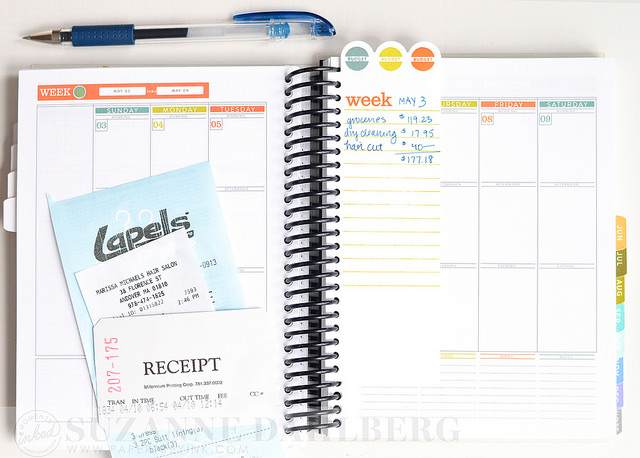
Here is Part 2: tracking my leftover budget on a week by week basis. I differentiate between bills and other expenses basically by how they are paid. To me, a bill is something that gets paid online or by sending payment in the mail. Everything else gets tracked as an expense on tabs like the one shown in these photos. I used the Divided Die and stamps from Divided Mini stamp set, Listed stamp set and Remembered stamp set along with Ocean Tides, Simply Chartreuse and Canyon Clay inks to create the insert:
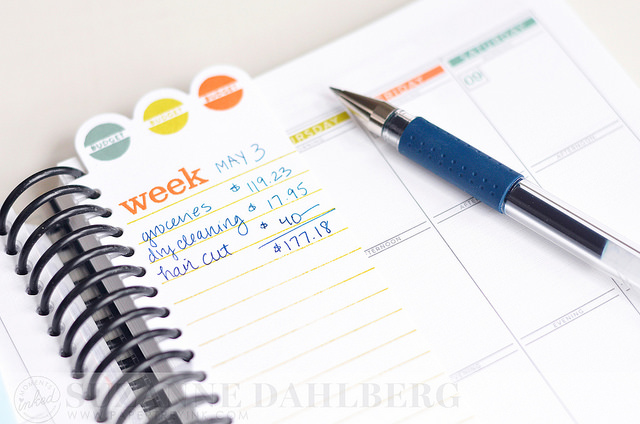
I track expenses for each week by keeping a running total of how much money I’ve spent. This is super helpful for me - you can see in the example above that I’ve spent roughly $177 on groceries, dry cleaning and a hair cut this week. This means that if my total budget for the week were $200, I would have $23 left to go; if my budget were $2000, YIPPEE SKIPPY and LUCKY ME! LOL
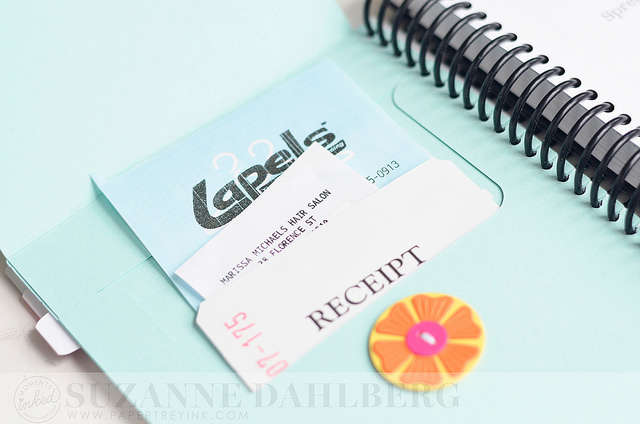
Since I’ve been traveling quite a bit for work these last few weeks, saving receipts for reimbursement has also been super easy using the pocket folder that I created using the Pocket Page die. (You can read more about that here.) My planner has been to Chicago, Santa Monica, Washington D.C. and New York City this year and it’s holding up GREAT. I love it so much.
Thanks so much for stopping by today! I hope these pointers were helpful for you. I’d love to create additional printables for the Moments Inked Memory Planner, so please let me know if certain ones are of interest to you. Have an awesome week!
Laura S.
May 4, 2025 at 7:23 AM (3 weeks ago)Thank you for the great tips and download!
Melissa Ladd
May 4, 2025 at 7:50 AM (3 weeks ago)Great ideas! I love how clean everything looks!!
Sarah Thieke
May 4, 2025 at 9:04 AM (3 weeks ago)I tried to print the file off and mine is cut off at the top and won’t print landscape on the page. Could you make it a pdf file? Thanks I love this idea!
Suzanne
May 4, 2025 at 11:22 AM (3 weeks ago)Hi Sarah! Have you tried printing it as a full page photo? Also, do not fit the picture to the frame when printing. You want it to print it’s actual size (or even reduce the size a little bit if you have that option).
Gay Ferland
May 4, 2025 at 9:26 AM (3 weeks ago)Now this is what I call visual bill paying system!!, I keep mine on my phone but no hard copy. I love how perfect everything is….I just love it!
Mandy
May 4, 2025 at 11:51 AM (3 weeks ago)I can’t get it to download. I see it, but the option to download isn’t there. What am I doing wrong?
Suzanne
May 4, 2025 at 12:12 PM (3 weeks ago)Hi Mandy! It’s like downloading a photo - if you right click you should see an option to “Save Image As…”
Mandy
May 4, 2025 at 12:16 PM (3 weeks ago)Oh, yeah. I’m a dork.
Karen L
May 4, 2025 at 12:18 PM (3 weeks ago)Thanks for the pro tables. These are exactly what I need!
Gail
May 4, 2025 at 1:35 PM (3 weeks ago)This is great! I have a separate book for my monthly bills, so it makes perfect sense to put everything together. You’re a genius! I have used the ideas to put cards in for birthdays, and now this!!!! Organization makes me so very happy - - thank you for making my life better!!!
Kim Rendino
May 4, 2025 at 3:44 PM (3 weeks ago)Thanks! I’m off to download now! I also want to say a huge THANK YOU for posting a few months ago about how you reduced the coil size of your planner. I finally got the courage to go to Fed Ex today and have mine done. I am SO MUCH HAPPIER with it now!
Shanna
May 4, 2025 at 4:04 PM (3 weeks ago)I absolutely love this. I need to get on it and get these dies!
Sherry G
May 4, 2025 at 7:01 PM (3 weeks ago)I love how you’ve organized this task so simply. Thanks so much for sharing your terrific template.